GPUCTL · AI GPU Scheduling Platform
-
No Kubernetes Knowledge Required
Submit training, inference, and Notebook jobs using declarative YAML familiar to ML engineers. The platform handles all underlying scheduling automatically.
-
GPU Resource Pool Management
Partition cluster GPU nodes into logical resource pools, providing isolation between training, inference, and development workloads.
-
Simple CLI Commands
gpuctl create / get / logs / delete— mirroring kubectl but optimized for ML engineers' workflows. -
RESTful API
Full REST API support for integration with existing MLOps platforms or third-party toolchains.
-
Unified Observability
View logs, events, and resource usage in one place.
gpuctl logs <job-name>works directly — no more hunting for Pod names withkubectl get pods. -
Automatic Quota Management
Namespace-level quotas created automatically. CPU / Memory / GPU limits visible at a glance. Requests exceeding quota are blocked with friendly error messages.
Overview
gpuctl is an AI compute scheduling platform designed for ML engineers, built to dramatically lower the barrier to GPU resource usage.
Through declarative YAML configuration and simple CLI commands, ML engineers can efficiently submit and manage AI training and inference jobs without needing to learn Kubernetes internals.
Core Problems Solved
| Pain Point | Impact | gpuctl Solution |
|---|---|---|
| 😰 High Kubernetes Learning Curve Pod, Deployment, Service concepts are complex |
ML engineers spend weeks learning Kubernetes concepts — PodSpec, ResourceRequirements, VolumeMounts. Submitting a job requires 100+ lines of YAML across multiple resource objects (Secret, ConfigMap, Job) | Declarative YAML with familiar fields Describe jobs using fields ML engineers already know: kind, job.name, resources.gpu. 15–20 lines of config to submit a training job, no K8s internals required |
| 😤 Complex GPU Environment Setup Driver, CUDA, NCCL dependencies are fragile |
Every new environment requires manually installing GPU drivers, CUDA Toolkit, cuDNN, configuring NCCL multi-GPU env vars, and installing DeepSpeed/VLLM. Version conflicts are common; setup can take hours or days | Pre-installed images, env vars injected automatically Official images with DeepSpeed, VLLM, LlamaFactory pre-installed. Platform injects NCCL_SOCKET_IFNAME, MASTER_ADDR, WORLD_SIZE automatically — no manual distributed training config needed |
| 😫 Multi-team GPU Resource Contention No resource isolation |
Training, inference, and experiment jobs share one cluster with no isolation. High-priority jobs get preempted by low-priority ones. One team running large-model training can monopolize all GPUs, blocking others | Resource pool isolation + quota management Partition the cluster into training, inference, and dev pools for physical isolation. Per-namespace CPU/Memory/GPU quotas are enforced automatically, ensuring fair resource allocation across teams |
| 😵 Complex Multi-GPU Training Configuration NCCL and DeepSpeed params are verbose |
Single-node multi-GPU training requires manually configuring NCCL env vars, DeepSpeed hostfile, and PyTorch launch args. Misconfiguration leads to training hangs or low efficiency | Declare GPU count, NCCL/DeepSpeed config injected automatically Just set resources.gpu: 4 in YAML. The platform generates DeepSpeed config, injects NCCL env vars, and initializes process groups automatically |
| 😵💫 Tedious Job Status Inspection Random Pod names are hard to remember |
With kubectl you must look up the random Pod name (e.g. training-job-7d9f4b8c5-x2mnp), run get pods, then describe pod. Pod restarts change names and require re-lookup | Operate by job name, Pod changes tracked automatically gpuctl get jobs shows all job statuses; gpuctl logs job-name streams logs directly with multi-replica aggregation. ML engineers only need to remember the job name they defined |
Architecture
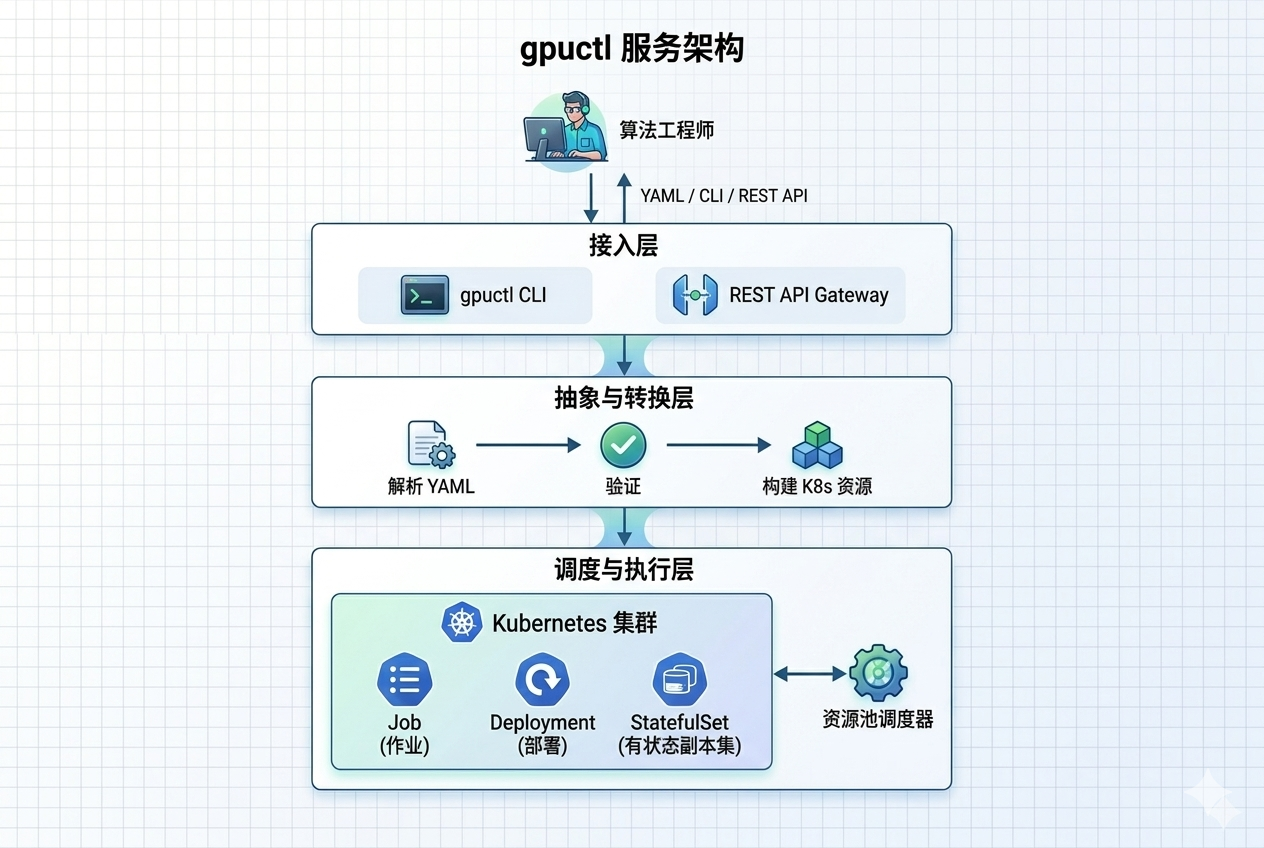
Supported Job Types
Ideal for LLM fine-tuning (LlamaFactory + DeepSpeed) and distributed training. Translates to a Kubernetes Job.
kind: training
version: v0.1

job:
  name: llamafactory-quickstart

environment:
  image: hiyouga/llamafactory:0.9.4
  command: ["bash", "-lc", "cd /app && llamafactory-cli train examples/train_lora/qwen3_lora_sft.yaml model_name_or_path=Qwen/Qwen3-0.6B template=qwen3 output_dir=/output"]

resources:
  pool: default
  gpu: 1
  cpu: 8
  memory: 24Gi

storage:
  workdirs:
    - path: /output
Deploy VLLM inference services with multi-replica support. Translates to a Kubernetes Deployment + Service.
kind: inference
version: v0.1

job:
  name: vllm-quickstart

environment:
  image: vllm/vllm-openai:v0.17.1
  command: ["python", "-m", "vllm.entrypoints.openai.api_server", "--model", "Qwen/Qwen2.5-3B-Instruct", "--host", "0.0.0.0", "--port", "8000", "--tensor-parallel-size", "1"]

service:
  replicas: 1
  port: 8000

resources:
  pool: default
  gpu: 1
  cpu: 8
  memory: 24Gi
Interactive development with JupyterLab. Translates to a Kubernetes StatefulSet + Service.
kind: notebook
version: v0.1

job:
  name: jupyter-quickstart

environment:
  image: quay.io/jupyter/scipy-notebook:2025-12-31
  command: ["start-notebook.py", "--NotebookApp.token=gpuctl", "--ServerApp.ip=0.0.0.0", "--ServerApp.port=8888"]

service:
  port: 8888

resources:
  pool: default
  gpu: 0
  cpu: 2
  memory: 8Gi
CPU-only services (MySQL, Redis, nginx, etc.). Translates to a Kubernetes Deployment + Service.
kind: compute
version: v0.1

job:
  name: mysql-quickstart

environment:
  image: mysql:8.4
  env:
    - name: MYSQL_ROOT_PASSWORD
      value: root123456
    - name: MYSQL_DATABASE
      value: demo
    - name: MYSQL_USER
      value: demo
    - name: MYSQL_PASSWORD
      value: demo123456

service:
  replicas: 1
  port: 3306

resources:
  pool: default
  gpu: 0
  cpu: 2
  memory: 4Gi

storage:
  workdirs:
    - path: /var/lib/mysql
Quick Start
# 1. Download the binary to the master node (no Python/pip required)
curl -L https://github.com/runwhere-ai/gpuctl/releases/latest/download/gpuctl-linux-amd64 -o gpuctl
chmod +x gpuctl && sudo mv gpuctl /usr/local/bin/

# 2. Submit a job
gpuctl create -f job.yaml

# 3. Check job status
gpuctl get jobs

# 4. Stream logs
gpuctl logs llamafactory-quickstart -f

# 5. Delete job
gpuctl delete job llamafactory-quickstart